Tasks description
Along with the source image, send a payload that describes which retouching operations should be applied.
Mode
This documentation only covers the "professional" mode. This parameter is required.
Tasks
For mode=professional, you must specify a list of tasks - which plugins should be applied and their settings.
Each task is a plugin name, the parameters for using this plugin, and a marker for whether to save the task result in a separate layer. Each plugin has no more than two main parameters. In API parameters they are mapped to "Alpha1" and "Alpha2" fields. The correspondence table with value ranges and parameter name mapping is given here.
- Plugin - plugin name.
- Alpha1 — first plugin parameter.
- Alpha2 — second plugin parameter.
- Scale — scale of the person in the photo, also can be interpreted as resolution.
For Clean Backdrop and Dust plugins, Scale defines dirt size: 1 targets the largest dirt particles, and 3 targets the finest / smallest dirt particles.
- 0 - auto detection
- 1 - close-up of the face
- 2 - half-body portrait
- 3 - full-body portrait
- Automask — Protects the person so changes apply only to the background. Available only for Clean Backdrop.
- Layer — flag that controls whether the task is returned as a separate layer.
- 0 - the task is applied directly to the flattened output image.
- 1 - the task is returned as a separate file. The final result is a ZIP archive with layers.
It is highly recommended to order tasks list by plugin name in same way as in the table below.
The numerical value of 1 corresponds to 100% value in the plugin.
| Plugin | Alpha1 | Alpha1 range | Alpha2 | Alpha2 range |
|---|---|---|---|---|
| Skin Mask | Sensitivity | [0, 2] | - | - |
| Clean Backdrop | Blend | [0, 1] | - | - |
| Remove Background | - | - | - | - |
| Heal | Sensitivity | [0, 1] | - | - |
| Fabric | Blend | [0, 2] | - | - |
| Dust | Blend | [0, 2] | - | - |
| Stray Hairs | Blend | [0, 1] | - | - |
| Eye Vessels | Blend | [0, 1] | - | - |
| Eye Brilliance | Blend | [0, 2] | - | - |
| White Teeth | Whiten | [0, 1] | Brighten | [0, 1] |
| Mattifier | Blend | [0, 1] | - | - |
| Dodge Burn | Blend | [0, 2] | Warmth | [0, 1] |
| Skin Tone | Blend | [0, 2] | - | - |
| Portrait Volumes | Blend | [0, 2] | - | - |
| Face Detection | - | - | - | - |
| Face Lifting | Named fields | Depends on parameter | - | - |
| Glasses Anti Glare | Glasses Glare Removal | [0, 1] | - | - |
| Color Correction | User Params | Named fields | - | - |
| Crop | User Params | Named fields | - | - |
Additional plugin notes
The plugins below are also supported in professional mode. Some of them use named fields or nested User Params instead of relying only on Alpha1 and Alpha2.
Remove Background
Remove Background automatically separates a wide range of foreground objects from the source image. It must be the only plugin in the tasks array. Use outputFormat: "png" with Layer: 0 for a ready transparent PNG. Add MaskOnly: 1 to return an 8-bit, single-channel grayscale mask with no RGB channels; BinaryMask: 0 preserves soft coverage, while BinaryMask: 1 returns a hard mask and is the default. Use outputFormat: "zip" with Layer: 1 for a foreground mask layer in an archive. See the AI Background Removal API guide for ecommerce, marketplace, DAM, PIM, CMS, direct alpha-mask, and custom compositing workflows.
{
  "mode": "professional",
  "outputFormat": "png",
  "tasks": [
    {
      "Plugin": "Remove Background",
      "version": 1,
      "Layer": 0
    }
  ]
}
Stray Hairs
Stray Hairs automatically removes detected loose and crossing hairs from portraits. Use Alpha1 from 0 to 1 for correction strength. With Layer: 0, the API returns a finished image. With Layer: 1 and ZIP output, it returns a full-size RGBA correction layer for normal blending. See the Stray Hairs Removal API guide for live before-and-after files, cURL, layered output, and integration guidance.
{
  "Plugin": "Stray Hairs",
  "Scale": 0,
  "Layer": 0,
  "Alpha1": 1.0
}
Crop
Crop supports AI image straightening, pose-aware portrait framing, subject-aware crop, document/passport portrait crop, and manual crop geometry through nested User Params. Use AutoStraightenMode: "AI" with Layer: 1 to write the predicted angle into ZIP result.json, or use Layer: 0 to return a flattened straightened image. Pose crop uses AutoMode: "Auto" or "Fixed" with AutoStraightenMode: "Person". Subject crop uses AutoMode: "Subject" and can return subjectMask RLE metadata in ZIP output. Manual crop uses AutoStraightenMode: "Manual", Angle, ManualCenterX, ManualCenterY, ManualArea, and aspect-ratio fields. See the Crop API overview, AI Straighten guide, Pose crop guide, Subject crop and mask guide, passport and ID photo crop API guide, and the Crop manual playground.
{
  "Plugin": "Crop",
  "Layer": 0,
  "User Params": {
    "AutoStraightenMode": "AI",
    "AspectRatio": "Original"
  }
}
Face Detection
Face Detection does not require user parameters. It detects faces and landmarks, writes face metadata to the result, and makes that data available to later face-aware plugins such as Face Lifting and Glasses Anti Glare. Landmark coordinates are normalized to the input image, where x=0/y=0 is the top-left corner and x=1/y=1 is the bottom-right corner.
{
  "Plugin": "Face Detection"
}
Typical Face Detection metadata. The detector currently returns 10 landmark points plus face metadata. The source code does not expose semantic names for every landmark, so the comments below only describe the source-backed index behavior: 3/4 are used as the eye pair, 6/7 are used as the mouth-corner pair, 0/1, 3/4, and 6/7 are swapped during horizontal-flip averaging, and 2, 5, 8, 9 are centerline/non-swapped landmarks. Remove comments if you copy the object as strict JSON.
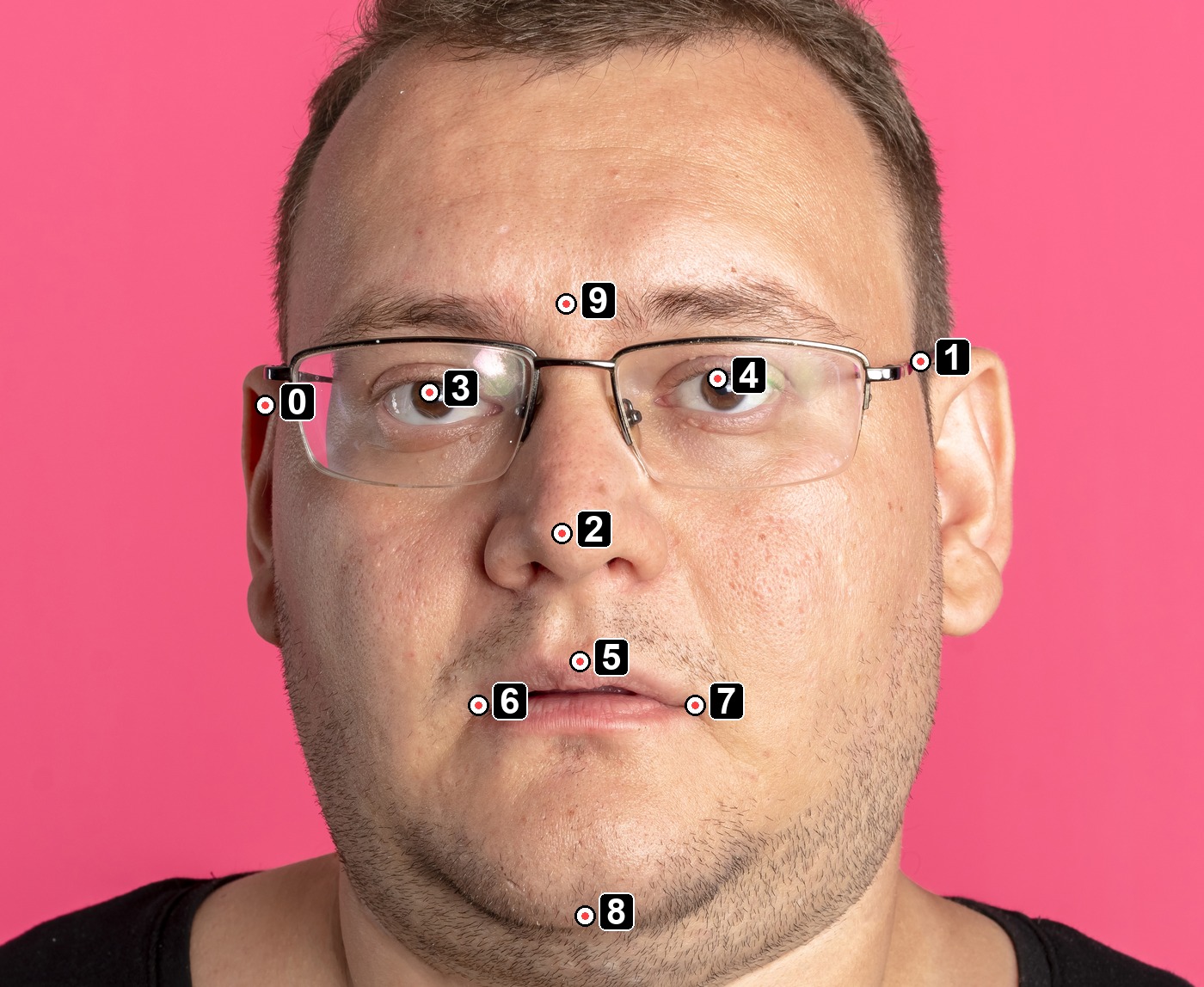
{
  "metadata": {
    "faces": [
      {
        "confidence": 0.8743641972541809,
        "faceAge": 42.75107955932617,
        "faceGenderFemale": -5.119027614593506,
        "faceGenderMale": 5.1189422607421875,
        "faceGlasses": 0.9999644756317139,
        "landmarks": [
          { "x": 0.40930742025375366, "y": 0.2873525619506836 }, // 0: side-specific landmark; swaps with 1 on horizontal flip
          { "x": 0.6650311350822449, "y": 0.26288726925849915 },  // 1: side-specific landmark; swaps with 0 on horizontal flip
          { "x": 0.5250742435455322, "y": 0.3583020269870758 },   // 2: centerline/non-swapped landmark
          { "x": 0.47323837876319885, "y": 0.28001296520233154 }, // 3: eye landmark; swaps with 4 on horizontal flip
          { "x": 0.5855494737625122, "y": 0.2726733684539795 },   // 4: eye landmark; swaps with 3 on horizontal flip
          { "x": 0.5319857001304626, "y": 0.42925146222114563 },  // 5: centerline/non-swapped landmark
          { "x": 0.4922448694705963, "y": 0.4537167251110077 },   // 6: mouth-corner landmark; swaps with 7 on horizontal flip
          { "x": 0.576910138130188, "y": 0.4537167251110077 },    // 7: mouth-corner landmark; swaps with 6 on horizontal flip
          { "x": 0.5339804887771606, "y": 0.5705606341362 },      // 8: centerline/non-swapped landmark
          { "x": 0.526802122592926, "y": 0.23108233511447906 }    // 9: forehead center / bindi-area reference; non-swapped
        ],
        "x1": 0.40239596366882324,
        "y1": 0.14056065678596497,
        "x2": 0.6788541078567505,
        "y2": 0.532005786895752
      }
    ]
  }
}
Dust
Dust uses the same parameter style as Fabric. Use Alpha1 for blend strength, Scale for dirt size, and optional Layer when you want a separate layer in ZIP output.
{
  "Plugin": "Dust",
  "Scale": 2,
  "Alpha1": 1.0
}
Color Correction
Color Correction uses nested User Params. For AI-guided correction, set Basic.Enable Basic to true and choose the AI mode with AI.Color Correction Mode: None, Exposure only, Exposure & WB, or Full.
{
  "Plugin": "Color Correction",
  "User Params": {
    "AI": {
      "Color Correction Mode": "Full"
    },
    "Basic": {
      "Enable Basic": true
    }
  }
}
Face Lifting
Face Lifting uses named parameters rather than Alpha1 and Alpha2. In flattened output, the most commonly used fields are Face Lifting, Face Masculinity, Face Femininity, Double Chin Correction, Face Lifting Depth, and Flow Smoothing. It is recommended to run Face Detection first so landmarks can be reused automatically.
When Layer: 1 is used, these depth parameters do not change the returned Face Lifting layer itself. They affect how the image is transformed internally before the next task runs, so later plugins in the same task list can use the lifted face geometry.
{
  "Plugin": "Face Lifting",
  "face_lifting_version": 3,
  "Face Lifting": 1.0,
  "Face Masculinity": 0.55,
  "Double Chin Correction": 1.0,
  "Face Lifting Depth": 0.6,
  "Flow Smoothing": 0.1
}
Glasses Anti Glare
Glasses Anti Glare uses the named field Glasses Glare Removal. In flattened mode, you can omit Layer. In layered mode, LayoutMode controls the returned layer format: patch returns compact face patches with placement metadata, and full returns a full-size overlay.
{
  "Plugin": "Glasses Anti Glare",
  "Glasses Glare Removal": 1.0,
  "LayoutMode": "patch",
  "Layer": 1
}
Layered Task JSON Example
This sample shows a complete professional-mode task list that requests multiple retouching plugins as separate layers. Each task uses Layer: 1, so the response is expected to contain layered output instead of only a flattened final JPEG.
{
  "mode": "professional",
  "tasks": [
    {
      "Plugin": "Clean Backdrop",
      "Scale": 0,
      "Layer": 1,
      "Alpha1": 1,
      "Automask": true
    },
    {
      "Plugin": "White Teeth",
      "Scale": 0,
      "Layer": 1,
      "Alpha1": 0.3,
      "Alpha2": 0.3
    },
    {
      "Plugin": "Mattifier",
      "Scale": 0,
      "Layer": 1,
      "Alpha1": 0.7,
      "Alpha2": 0
    },
    {
      "Plugin": "Dodge Burn",
      "Scale": 0,
      "Layer": 1,
      "Alpha1": 2,
      "Alpha2": 0
    },
    {
      "Plugin": "Skin Tone",
      "Scale": 0,
      "Layer": 1,
      "Alpha1": 2,
      "Alpha2": 0
    },
    {
      "Plugin": "Portrait Volumes",
      "Scale": 0,
      "Layer": 1,
      "Alpha1": 1,
      "Alpha2": 0
    }
  ]
}