

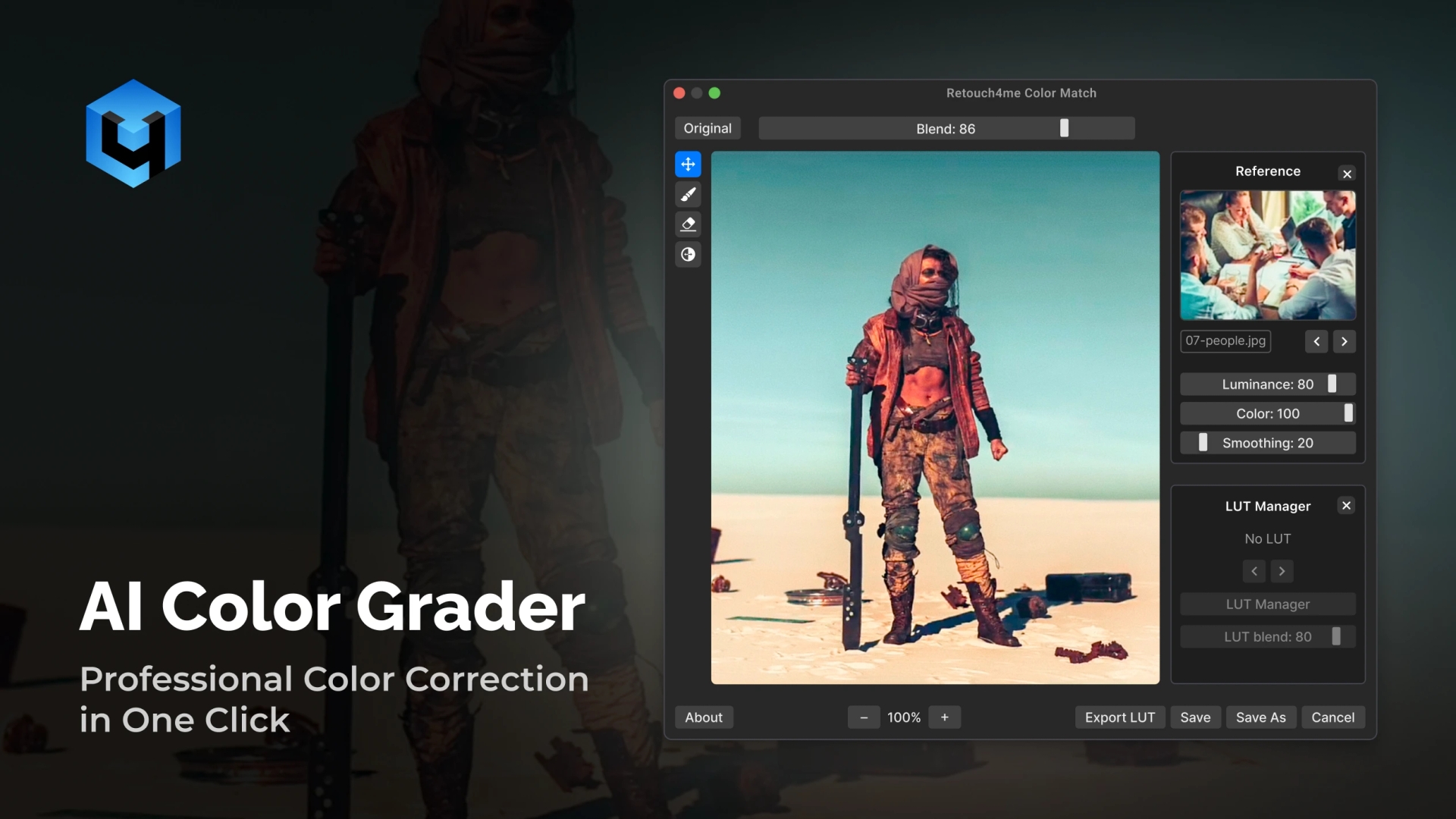
Bring professional photo color grading to your workflow. Instantly grade and correct colors with advanced Retouch4Me Color Match AI technology. Achieve cinematic tones and consistent color across photos and videos while keeping your photo color accurate and natural. Designed for photographers, retouchers, and creative professionals.
Perform Image Color Correction in Second
No credit card required. Works on macOS and Windows.
Retouch4Me AI Color Correction Features for Consistent Results
Match Styles from References
Upload a reference frame or image, and Retouch4Me Color March AI recreates its color grade. Replicate different creative styles from films, campaigns, or personal presets with an easy workflow.
Consistent Looks Across Your Projects
Whether editing a full video sequence or a photo series, AI ensures every frame and image matches in tone and style for a unified look.
True-to-Life Skin Tones
Enhance creative color grading and color correction without distorting skin color. Images remain realistic, balanced, and natural, even under challenging lighting.
Smart Tone and Color Balance
AI applies precise color adjustment – contrast, saturation, hue, and brightness – automatically. The AI helps you correct the color while preserving fine details.
Fast Workflow, Professional Results
Apply advanced correction and color grading in seconds with Retouch4Me Color Match and Color Match Video plugins. Designed for high-resolution photography and video editing without compromising quality.
Perfect for Every Type of Photography
From photo editing to commercial shoots, this AI color grading tool adapts to any style of photography. Apply consistent looks and cinematic tones with just one click.
Portrait Photography: Keep skin tones natural and face details accurate while enhancing mood and atmosphere. Bring the right atmosphere to the entire shoot.
- Deliver cohesive portrait galleries with professional, film-inspired grading, using Retouch4Me.
Wedding Photography: Create cohesive, cinematic looks across hundreds of images.
- Create timeless, cinematic memories with consistent photo colors.
Commercial and Editorial Work: Deliver great, color-consistent results for campaigns. Ensure background colors stay true for catalogs and campaigns.
- Produce a commercial-quality visual that matches client style guides with our color correction tool.
Ecommerce Photography: Match tones across product images for a uniform catalog.
- Ensure every image looks uniform and professional online.
Event Photography: Balance varying lighting conditions for consistent galleries.
- Maintain a consistent color identity across large galleries.
Creative Projects: Apply cinematic styles or match references from film and art.
- Experiment with artistic palettes to elevate your storytelling.
How to Use Our Online Color Correction Tool
- Download Standalone App or Plugin
- Install the app or plugin easily on macOS and Windows.
- Works standalone or as a plugin in Photoshop, Lightroom, and more.
- Choose a Reference Picture
- Upload a photo or frame with color tones you want to match.
- The AI analyzes its palette automatically.
- Match the Color
- Upload your target image or video.
- The AI applies matching tones and grading instantly.
- Apply or re-apply adjustments anytime, or change intensity to your liking.
- Save and Export
- Export high-quality results in your chosen format.
- Continue editing in Lightroom, Photoshop, or any workflow tool.
Still not sure if it fits your workflow? Try it free and see the results yourself.
Download Free Trial
The Professional’s Choice for Advanced Color Corrector – Retouch4Me
| Feature / Benefit | Retouch4Me | Manual Grading | Free Online Apps/ Color Grading Tools |
| One-click cinematic grading | ✅ Yes | ❌ No | ⚠️ Limited |
| Consistent results across sets | ✅ Yes | ⚠️ Requires skill | ❌ Often inconsistent |
| Style matching from references | ✅ Yes | ❌ Manual only | ⚠️ Usually limited |
| Fast & beginner-friendly | ✅ Yes | ❌ Steep learning curve | ✅ Yes, but basic |
| Access to LUT Cloud and create own LUTs | ✅ Yes | ❌ Not available | ❌ Not supported |
Elevate your photo color correction with one click.
Get Started Now
Retouch4Me AI Color Grading Tools: Quick Review
Frequently Asked Questions About Color Grader
Can this tool replace manual color grading?
Absolutely! It speeds up the process significantly, but you can still fine-tune results for full creative control, saving you time.
Does it work with video?
Yes, Retouch4Me Color Match Video is built for video editing workflows and photography. Make your work cinematic with one click.
Can I match the look of a movie or photo style?
Yes. Simply upload a reference frame, and AI reproduces that grading.
Is it suitable for professional use?
It handles RAW images and high-resolution video while delivering results trusted by professionals.
How does this tool work?
The AI automatically analyzes tones and does color correction across the image. It ensures grading and color correction feel natural.
How is Retouch4Me better than others?
Unlike basic tools often used for quick fixes, Retouch4Me supports professional formats and desktop workflows. This AI grader adapts to different styles while fitting into your existing editor setup.
Where can I get help or support?
You can find our detailed FAQ. For direct assistance, contact our support team through the chat or personal account.
How does this fit with other Retouch4Me products?
This tool works seamlessly with other Retouch4Me solutions. You can combine them to build a complete retouching workflow.
Where can I find your policy, terms, or contact the company?
A; All legal documents are listed on our official Terms and Conditions page. To reach us directly, use the chat or submit a request via personal account.