

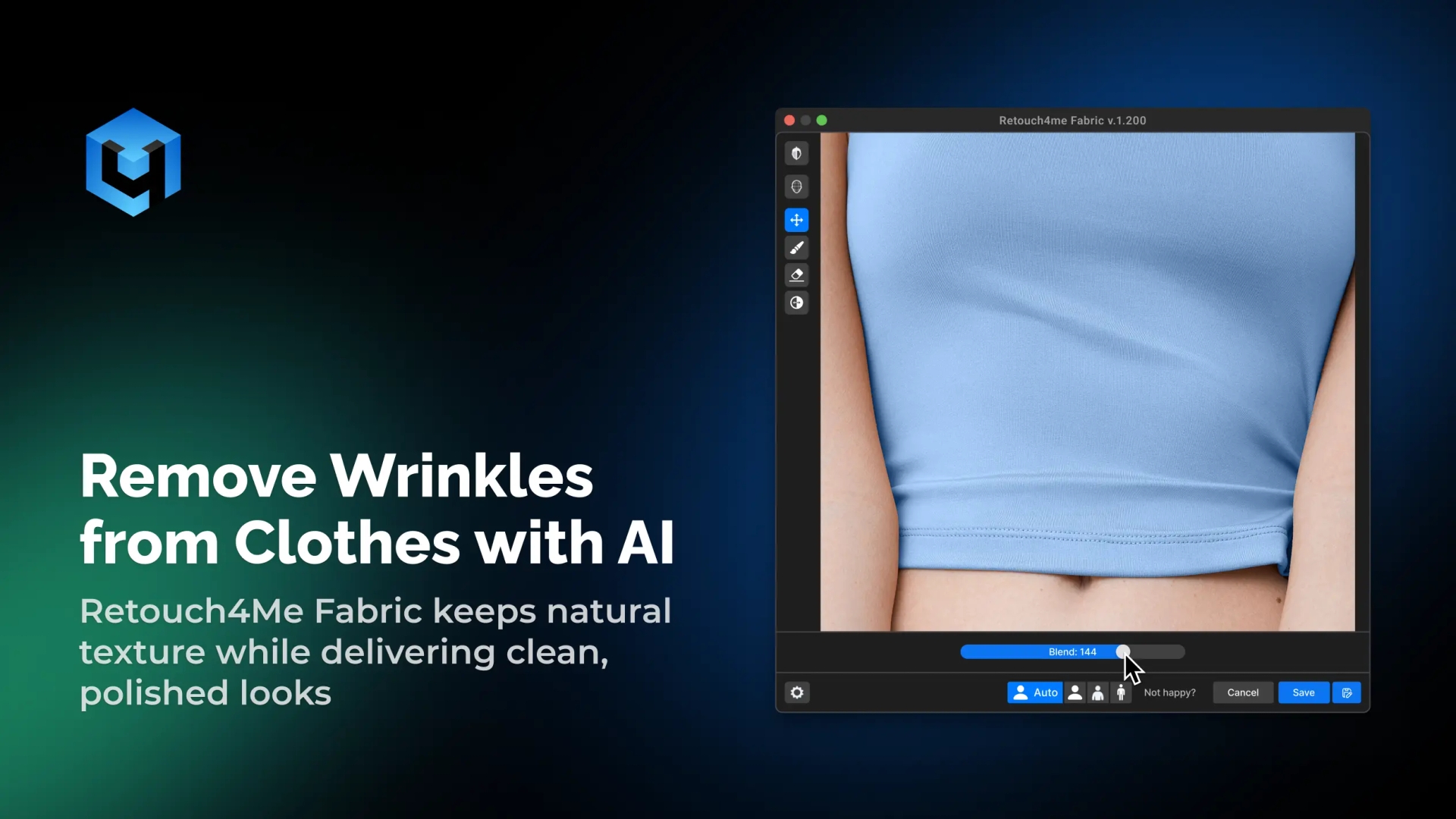
Are you wondering how to remove wrinkles from my photos? Look no further, remove wrinkles from clothes pictures with AI remover. Retouch4Me Fabric lets you remove clothes wrinkles and unwanted creases in seconds from clothing, keeping fabric texture realistic. From fashion designers to business portrait photographers, it’s perfect for anyone who values clean, polished looks.
What Makes Retouch4Me Fabric Stand Out
AI Fabric Smoothing
The tool detects and removes wrinkles or creases automatically and irons them out in every shirt or garment. Simply select your preferred strength and see the results instantly.
Preserve Natural Details
Retouch4Me Fabric makes it easy to remove wrinkles from clothes in one click, without flattening lines and folds in fabric. Maintain the integrity of clothing design while achieving a refined appearance.
Works on Any Clothing Material
Handles cotton, silk, denim, or formal wear with equal precision. AI adapts to different fabrics for seamless, consistent results.
Batch Processing for Efficiency
Edit your entire catalogs or photoshoots automatically, making work efficient. Save hours while ensuring every garment looks its best.
Background Cleanup Option
Quickly remove backdrop wrinkles to keep your entire frame clean and consistent. Maintain focus on your subject with perfect consistency.
AI Wrinkle Remover for Every Type of Photography
From eCommerce to selfies, Retouch4Me helps anyone who wants to make their photos perfect by naturally enhancing the appearance of an image.
- Portrait & Fashion Photography: Smooth out clothing wrinkles while keeping outfits natural.
- Deliver crisp, editorial-quality images ready for publication.
- Ecommerce & Product Photography: Remove wrinkles across large catalogs in minutes, saving you time.
- Ensure your product photo with neat clothing looks neat and consistent.
- Commercial Campaigns & Lookbooks: Perfect clothing presentation for client and brand needs.
- Deliver flawless visuals that enhance your fabric quality and color.
- Event & Wedding Photography: Fix wrinkles in suits, dresses, and formalwear quickly.
- Maintain clean, timeless aesthetics in every shot.
Still Thinking It Over? Here’s Why It Works
Deliver Professional-Quality Results
Ensure every image meets studio and client standards. From your beauty portraits to product pages, it offers the right balance between realism and efficiency. Achieve consistency across your entire workflow easily.
Save Time on Manual Retouching
Forget tedious clone and healing work. AI lets you achieve flawless wardrobe results and remove wrinkles from photos in seconds. It’s the ideal way to fix wrinkles fast, making every shot look great.
Maintain Realistic Fabric Texture
Achieve wrinkle-free clothing that still looks real – no advanced skills needed. Preserve fabric depth, grain, and shadow.
Consistency Across Entire Galleries
Keep all clothing looking sharp and uniform. Ensure visual harmony across your full set of product or fashion photos.
How to Remove Wrinkles From Photo
- Download and Install
- Install on macOS or Windows.
- Use as a standalone or plugin for Photoshop, Lightroom, Capture One, Apex, or Arams.
- Upload Your Photos
- Import single portraits or full catalogs of images.
- Let AI Remove Wrinkles Automatically
- The tool detects and edits your uploaded clothes in photos automatically.
- Fine-Tune the Results
- Adjust strength to match the desired look from natural to editorial polish.
- Export and Continue Editing
- Save as JPG or PNG, or continue editing in your preferred software.
Why Retouch4Me Fabric Tool
| Feature / Benefit | Retouch4Me Fabric | Manual Retouching | Free Apps |
| Result Quality | ✨ Professional & Realistic | ⚠️ Depends on skill | ❌ Low resolution |
| Texture Preservation | ✅ Keeps seams & folds intact | ⚠️ Risk of over-smoothing | ❌ Flat textures |
| Speed | ⚡ Instant, AI-driven | ⏳ Time-consuming | ⚠️ Slow on large files |
| Clothing Types | 🧵 All materials supported | ⚠️ Manual adjustment required | ❌ Limited recognition |
| Workflow Integration | 🔌 Plugins + Standalone app | ⚙️ Manual export/import | ❌ No pro integration |
| Consistency | 🖼️ Perfect across photos | ⚠️ Varies shot to shot | ❌ Inconsistent results |
| Ease of Use | 👆 One click, no masking | 🖊️ Detailed retouching needed | ⚠️ Few options available |
Customer Reviews
Retouch4Me Fabric Tool: Quick Review
Our most popular plugins
Remove Wrinkles From Clothes: FAQs
- Can it remove wrinkles from any type of clothing?
- Yes. The AI recognizes shirts, suits, dresses, and more and removes clothes wrinkles from photos instantly.
- Does it keep fabric details intact?
- Yes. The system preserves texture, seams, and design patterns while removing wrinkles. Works perfectly before or after retouching clothing or profile details.
- Can I batch-process photos for catalogs?
- Yes. You can smooth out entire galleries automatically.
- Does it support both portraits and product photos?
- Absolutely. It works perfectly for portraits, eCommerce images, or studio shoots.
- How does it integrate with other Retouch4Me plugins?
- It complements tools such as Heal, Dodge&Burn, and Skin Tone for a complete, professional retouching workflow.
- Can I be flexible with the retouching?
- Absolutely! Choose your editing style from natural to editorial and add final touches in seconds. The smart AI technology adapts to any clothes type automatically.
- Where can I get help or contact support?
- Visit our contact page or read our help portal. You can also learn from our resources and blog. Our service team is always available.
- Does it support store or product photos?
- Yes. It’s ideal for store or eCommerce setups where clothing must look neat.
- Where can I find your terms and policy?
- All terms and policy details are on our website.