

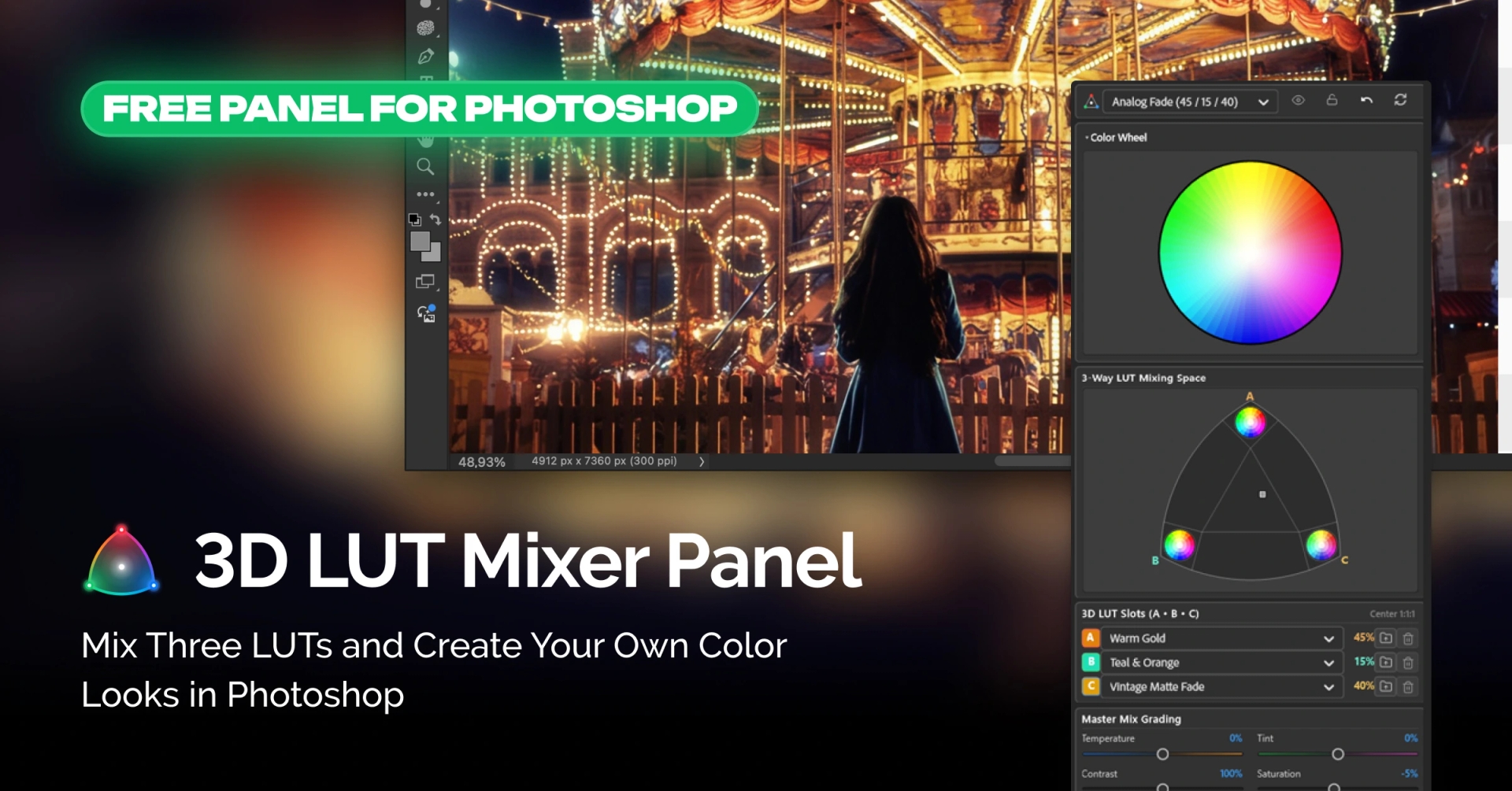
A New Way to Work with LUTs
3D LUTs have long been a familiar tool for photographers and videographers. They make it easy to transform an image’s color palette, create a specific mood, and maintain a consistent visual style across a photo series.
However, working with multiple LUTs often means switching between files, comparing results, and manually adjusting layer opacity to achieve the desired color combination.
Retouch4me 3D LUT Mixer Panel offers a more flexible approach. This free Adobe Photoshop plugin lets you mix up to three 3D LUTs simultaneously, adjust their individual contributions, and fine-tune the final color grading.
Mix Three LUTs in One Interface
The plugin’s key feature is its interactive triangular mixer (3-Way Mix).
The triangle has three vertices, each representing one LUT: A, B, or C. By moving the control point inside the triangle, you adjust the proportions of all three color profiles. Their combined weight always equals 100%.
This makes it easy to experiment with different color combinations and discover new looks without having to apply multiple LUTs separately and manually adjust their opacity.
You can use a single LUT at 100%, combine two profiles, or mix all three in any proportions.
Use Built-In LUTs or Import Your Own
Retouch4me 3D LUT Mixer Panel includes a built-in library of ready-to-use profiles. It features presets designed for different creative styles and color grading needs:
- Balanced Trio
- Golden Warm
- Emerald Drama
- Analog Fade
- Bleach Bypass
You can also import your own LUT files in .CUBE and .3DL formats. Imported profiles are saved in the plugin’s library, making them easy to access in future projects.
Once you find a combination you like, you can save it as a custom preset or export it as a JSON file for later use.
Fine-Tune Colors After Mixing
After choosing your LUT combination, you can further adjust the final image using the Post-Mix Color Grading tools.
The available settings include:
- Temperature — adjusts the color temperature.
- Tint — fine-tunes green and magenta tones.
- Contrast — controls image contrast.
- Saturation — adjusts color intensity.
- Strength — controls the overall intensity of the color transformation, from 0% to 200%.
If you want to compare different LUT combinations without changing your existing color grading settings, use the Lock Sliders feature. It keeps your slider adjustments fixed while you switch between mixing options.
Analyze Color Changes with Visual Tools
For more precise color work, the plugin includes additional visualization tools:
- A color wheel for monitoring color shifts.
- An interactive 3D Color Cube for analyzing color transformations.
- Two 3D Color Cube precision options: 33×33×33 and 65×65×65.
You can also quickly compare the edited result with the original image using the Before / After feature.
Work Without Altering the Original Image
Retouch4me 3D LUT Mixer Panel uses a non-destructive approach to color grading in Photoshop.
When you apply the result, the plugin creates a Color Lookup adjustment layer. The original image pixels remain untouched, allowing you to revisit and refine the color transformation at any point in your workflow.
This is especially useful when you need to adjust the effect’s intensity, change your settings, or compare different versions of your color grading.
Export LUTs for Other Applications
Your custom color combinations can also be used outside Photoshop.
The plugin lets you export the final color transformation as a single .CUBE or .3DL file. These formats are compatible with various photo and video editing applications, including:
- DaVinci Resolve
- Adobe Premiere Pro
- Final Cut Pro
This means you can develop a custom color combination in Photoshop, export it, and apply it in other editing workflows.
Who Can Benefit from Retouch4me 3D LUT Mixer Panel?
The plugin is designed for photographers, videographers, and colorists who regularly work with LUTs and want more flexibility when creating their color looks.
It can help:
- Photographers — develop distinctive color styles for portrait, wedding, and commercial photography.
- Videographers — create custom color profiles for use in video editing.
- Colorists — experiment with multiple LUTs and gain more precise control over the final result.
- Preset creators — save custom combinations and export them for use in other applications.
Free for Photoshop Users
Retouch4me 3D LUT Mixer Panel is a free Adobe Photoshop plugin that expands your options for working with 3D LUTs and color grading.
It requires Adobe Photoshop version 26.0 or later and supports Windows 10 and Windows 11, as well as macOS on Intel, M1, and M2 computers.
Try Retouch4me 3D LUT Mixer Panel and create your own color looks by combining three LUTs.