

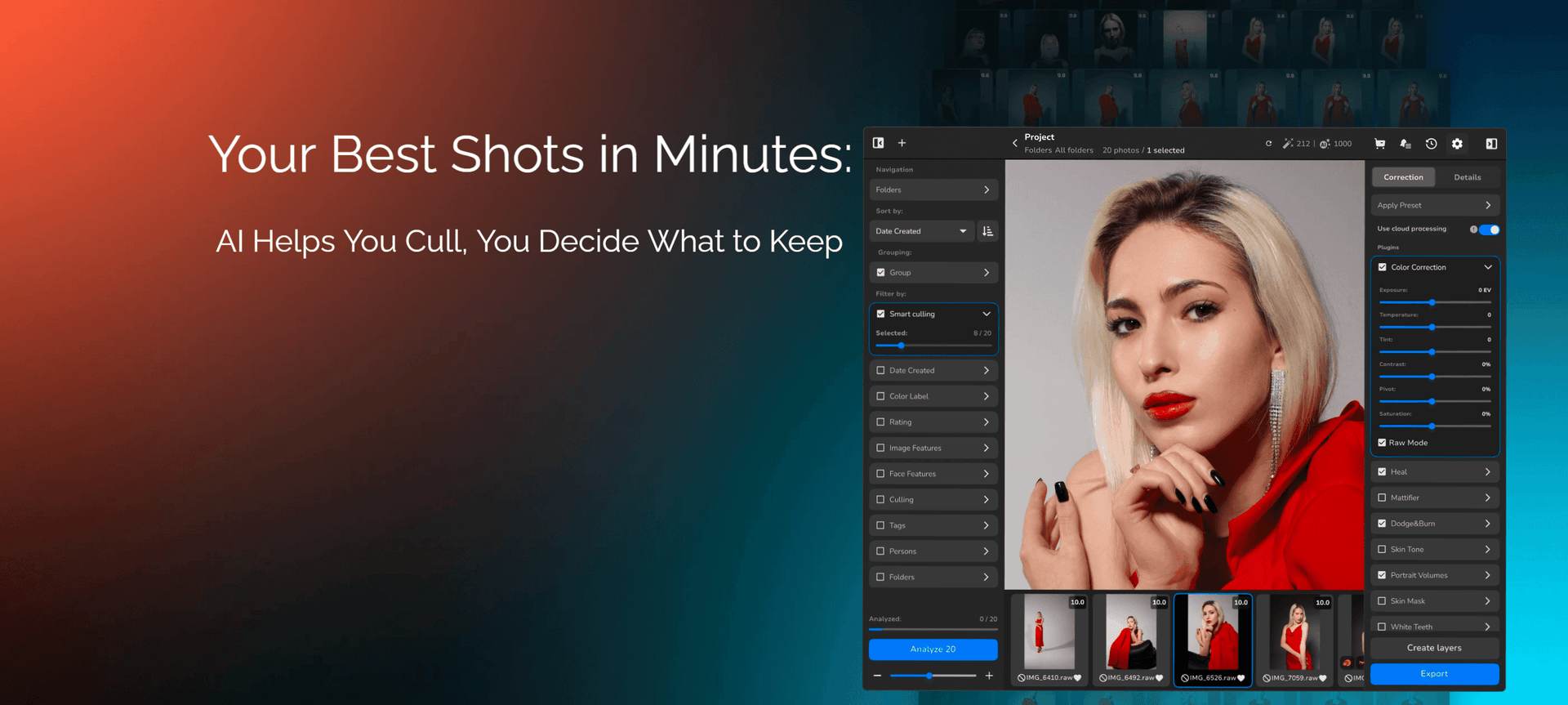
After a school, portrait, or family session, a corporate event, or a content shoot, you need to review hundreds of images, check sharpness and facial expressions, select suitable shots, and decide which ones to edit or deliver to your client.
In Arams, you can delegate part of this work to AI. The software analyzes image quality and faces, assigns preliminary ratings, and helps narrow down your selection. The final decision stays with you: you can change automatic ratings and adjust the culling criteria to suit your task.
More Than Browsing Photos: Knowing Where to Start

Manual culling means answering the same questions over and over: Is the face in focus? Are the eyes closed? Is there an exposure problem?
Arams checks these attributes during analysis and gives each image a rating from 1 to 5. You can enable issue icons on the thumbnails and use the Details panel to see which attributes affected the result. If an image contains multiple faces, the software shows the detected faces and flags issues for each one.
This gives you a clear starting point. You do not have to begin by reviewing the entire folder in sequence. Instead, you can open highly rated images first or filter photos by specific attributes.
However, a technical rating is not the same as an editorial decision. Your task depends on more than sharpness and exposure: you may need a particular person, a key moment, the right expression, or a shot that meets the brief. Treat the AI-assisted selection as a starting point for your final review, not as a finished result that needs no checking.
School and Preschool Photography: Focusing on Faces

Imagine a series of children’s portraits: several shots of each child, different expressions, and slight changes in pose. Choosing the right image means considering both technical quality and how well the portrait captures the subject.
For this task, you can use face analysis in Arams to identify images where the software has detected closed eyes or an out-of-focus face, then filter by those attributes. If needed, you can inspect the details for an individual face to understand what affected the image’s rating.
Learn more in our video:
A practical workflow looks like this:
Run analysis on the selected series or folder.
Filter images by ratings and detected issues.
Review the remaining options and choose the right expression.
Arams supports analysis of individual images, selected groups, and entire folders, so you can start with a small set rather than the whole shoot.
A final review is especially important for group photos. An overall rating helps you navigate the images, but the final shot needs to work for everyone in the frame—not just score well technically.
Corporate Events: Building an Initial Selection
After a conference, presentation, or company event, you may need several different sets of photos: one for a website news story, another for social media, and another for the client’s report.
Here, it helps to divide the process into two stages: technical culling first, then selection based on the content you need.
During the first stage, Arams lets you filter images by rating range and sort them by rating. Alternatively, you can set filters based on detected image and facial attributes. Both approaches help you focus on more suitable candidates.
During the second stage, you check whether the selection includes everything required: speakers, guests, wide shots, details, and key moments from the event. This needs a separate review. The analysis demonstrated in the video evaluates technical and facial attributes, not whether your event coverage is complete.
AI helps organize the initial review; you decide what story the final selection tells.
Social Media Managers and Content Creators: Selecting a Specific Number of Images
After a content shoot, the task is often not “select every good photo,” but “find ten images for upcoming posts” or “choose twenty shots for further editing.”
Arams offers Smart Cull for this purpose. You can use a slider to set the number of images you need, and the software automatically selects that number of top-rated images based on the analysis. The video demonstrates this option for tasks with a fixed number of final photos.

Suppose you need 15 images for a series of posts. You set that number, receive an initial selection, and then check it against your content plan.
It is important not to confuse quantity with variety. In the video, Smart Cull is shown as a tool for selecting a specified number of the best images—not as a way to automatically build a story, ensure different angles, or meet the requirements of an advertising brief. Those criteria remain part of your final decision.
Remove Obvious Rejects First, Then Choose Your Best Shots
After a shoot, a photographer may have 1,200 images or more. Choosing the best ones means reviewing all of them—including accidental shots, obvious motion blur, and poorly timed blinks. Many photographers are ready to delegate precisely this repetitive work.
The desired outcome is simple: start a thoughtful selection process with half that number rather than all 1,200 images. Of course, this is not a universal ratio. How many images you can reject depends on the shoot. The point is to reduce the amount of technical review before the creative selection begins.
In this scenario, culling in Arams can be organized into two stages.
The first is technical. AI helps identify potential rejects using the available criteria, and the photographer checks the flagged images. At this stage, the algorithm does not need to understand the story, mood, or creative intent. Its task is narrower: to draw attention to images that may be unsuitable for technical reasons.
The second is creative. The photographer works with the remaining selection, comparing expressions, choosing gestures and movement, assessing composition, and deciding which images complement one another and form a cohesive series.
These are different decisions. Checking whether someone blinked is not the same as choosing the most expressive portrait. And a technically sound image is not necessarily the most important photograph from the shoot.
Flagging Does Not Mean Deleting
Preliminary culling should not turn into permanent deletion without review. Closed eyes can be part of an expressive portrait, and blur can be intentional. Even a technically imperfect image may preserve a moment that appears nowhere else.
AI’s role is to suggest candidates for rejection, not to deliver a final verdict. The photographer reviews borderline cases and keeps images whose technical imperfections do not interfere with the creative intent.
Less Reviewing, More Attention
The value of this workflow should not be judged by how closely the algorithm’s choices match the final gallery. More important questions are how much time it saves during the first pass, how easy it is to check the proposed rejects, and whether any valuable images have been overlooked.
Automation does not replace professional judgment here. It helps you avoid spending that judgment on every repetitive technical decision.
A good result is not AI choosing photos for you. It is reaching the images worth choosing between sooner.
Automatic Ratings Should Not Get in the Way of Your Vision
Sometimes a technically questionable shot is exactly the one you need. Closed eyes may contribute to an expressive portrait, and unusual exposure may be intentional.
Arams lets you move beyond the automatic rating. You can exclude individual detected attributes from the rating calculation, and the score will update. Alternatively, you can assign a rating manually using the stars in the interface or the number keys from 1 to 5.
To make the source of each rating clear, the software distinguishes them visually: automatic stars are white, while manually assigned stars are yellow.
This lets you use AI as an assistant without handing over the decision about which image fits your vision.
Getting Started: From a Folder to an Initial Selection
You can organize the process into a few steps.
Run the analysis. Use the context menu for individual images or a selected group, or the navigation panel for folders. You can also enable automatic analysis of project photos in Settings.
Review the results. Check the ratings, issue icons, and information about images and faces in the Details panel.
Narrow down the selection. Use the rating filter, filters for detected attributes, or Smart Cull if you need a specific number of images.
Check the selection manually. Make sure the photos meet your needs and adjust ratings where necessary. Arams supports manual rating changes.
Move on to editing the selected photos.
What to Know Before You Start
Image analysis in Arams is a paid, optional feature. Analyzing one image uses one credit. Your remaining credit balance is displayed at the top of the interface.
Analysis requires an internet connection: a low-resolution preview of the image is sent to the server. You control when analysis runs. You can enable automatic analysis or run it manually only for the photos or folders you need.
For your first test, start with one real shoot. Check which issues the software detects, how ratings are calculated, and which filtering method suits your task.
Sign up to receive 100 culling credits in Arams.
Start With the Task You Need to Complete After the Shoot
For a school portrait session, that task might be choosing successful portraits. For a corporate event, it could be building an initial selection for publication. For a content shoot, it may be selecting a fixed number of images for further work.
Arams offers three ways to narrow down your choices: by rating, by detected attributes, and by the number of images required. You choose the approach, review the result, and decide which photos move forward.